> For the complete documentation index, see [llms.txt](https://docs.paragontruss.com/llms.txt). Markdown versions of documentation pages are available by appending `.md` to page URLs; this page is available as [Markdown](https://docs.paragontruss.com/design/getting-started/interface-overview/header.md).
# Header
## Release Notes Notification
The Release Notes notification will appear when a version update has relevant release notes. New notes will appear automatically but can be dismissed. Until the notes are marked as read, the notification will remain and can be clicked to reveal the release notes.
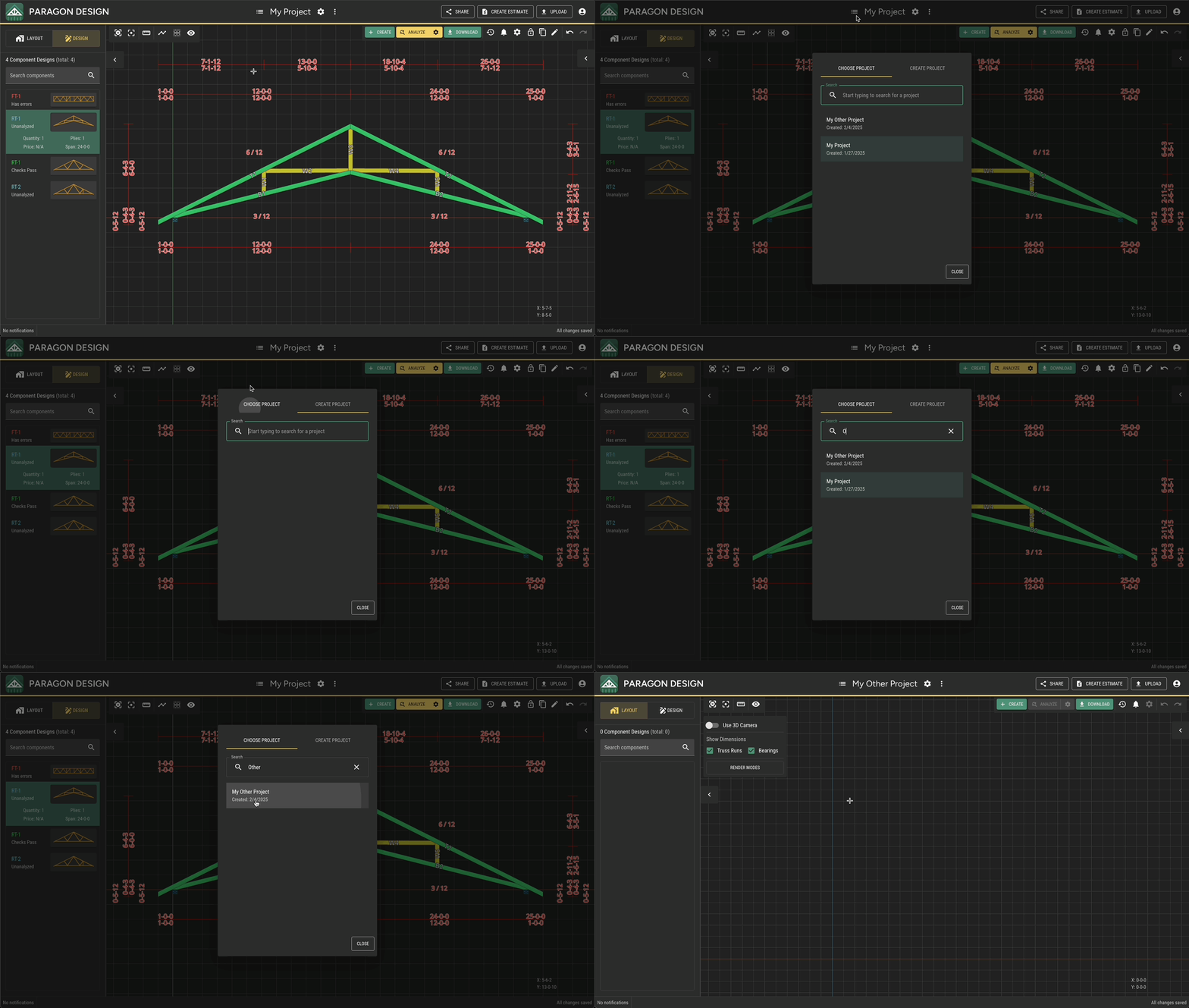
## Choose/Create Project
This tool allows you to select or search for a project as well as create a new one. See [instructions on how to create projects](/design/how-to/general/create-projects-and-components.md). Additionally, you can view and save sample projects for ideas and experimentation.
## Current Project
The name of your project will appear here.
## Project Settings
This menu contains Project Level Load, Analysis, Materials, and Feature Pattern Settings. You can learn how to [modify these settings](/design/how-to/general/modify-project-and-component-settings.md).
### Load Settings
`Load Settings` allow you to define the specific load criteria for components.
### Analysis Settings
`Analysis Settings` allow you to define the specific analysis criteria for components.
#### Plating Settings
* Fabrication Tolerance\\
A Fabrication Tolerance can be specified separately for `Front-Back Plates` and for `Top-Bottom Plates` . This value determines the Quality Control Factor (Cq).
* Add Plates Along Stacks\\
This option adds plates where necessary along stacked members to achieve the specified maximum spacing.
* Add Plates Along Stacks\\
Use `Add Plates Along Stacks` for additional control of stacked member plating.
* Plate Ribbon Blocks
Use `Plate Ribbon Blocks` to require two plates per ribbon block. Unchecking this option only applies a single plate for a standard ribbon block and will not apply any plates to a double ribbon condition. This options assumes ribbon blocks will be nailed to the adjacent web during fabrication.
* Minimum Plate Size by Joint Type\\
By default, Splice joints start at 3x6. Additionally, Paragon provides settings to control the starting plate sizes for Heel and Peak plating. For both Heel and Peak joints, settings enable you to separately define the minimum `Width` and the minimum `Length` for these joint types to accommodate your specific design and manufacturing preferences and standards.\
\
For example, if the `Heel Plate Min Width` is set to 4" then Paragon will not even consider any plates less than 4" even if a smaller plate could work at the specific joint.
{% hint style="info" %}
Note
Peak Plate minimum settings apply to joints when a positive slope is adjacent to a negative slope.
{% endhint %}
### Material Settings
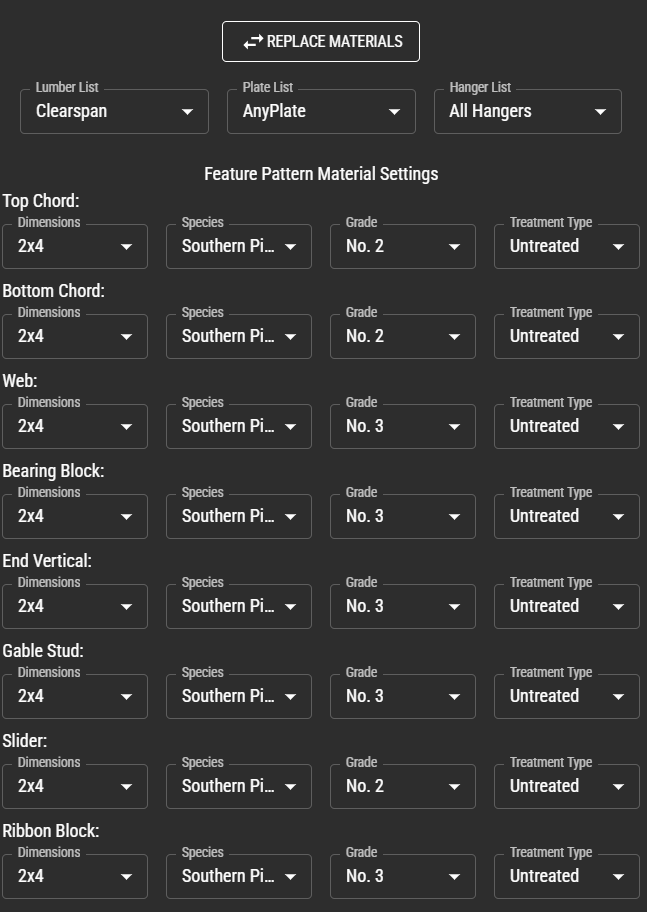
`Material Settings` allow you to define the specific Lumber List, Plate List, and Hanger List to use for you project or specific components. Materials are set up and managed in the [Materials App](https://materials.paragontruss.com).
### Feature Pattern Settings
`Feature Pattern Settings` allow you to specify several default properties to use when creating Feature Pattern Trusses from scratch from within Design mode. Currently, components created from Layout mode do not use the `Feature Pattern Settings`, but , rather use Layout system defaults.
Feature Pattern Settings include:
* Length
* Depth
* Slope
* Left and Right End Conditions
* Interior Conditions
* General Settings
* Zone Settings
* Chase Settings
### Default Profile Settings
`Default Profile Settings` allow you to define default properties used when creating new components from scratch within Design mode. Currently, components created from Layout mode do not use the `Default Profile Settings`, but , rather use Layout system defaults.
## Project Menu
This menu contains shortcuts to Create Component Design, Edit Properties, Project Settings, Locking Options, Create an Estimate, and Open Other Project. Additionally, you can Analyze All Components in the project or Design All Truss Envelopes.
## Analyze All Components
If a project-wide change has been made, like updating a code, this button can automate the analysis of all trusses within the project.
### Design all Truss Envelopes
This tool automatically generates component designs for all empty Truss Envelopes in a layout.
## [Share](/design/how-to/general/share-trusses-and-request-seals-or-repairs.md)
This opens the `Create Shared Component Set`dialog.
## [Create Estimate](/design/how-to/general/create-an-estimate.md)
You can use the Create Estimate tool to quickly create a CSV or PDF using existing or custom pricing for materials.
## Upload
This tool allows you to upload supported file formats.
## User Menu
This opens a dropdown menu with links to Docs (you are here!), feedback forms, usage statistics, user settings, and more.
---
# Agent Instructions
This documentation is published with GitBook. GitBook is the documentation platform designed so that both humans and AI agents can read, navigate, and reason over technical content effectively. Learn more at gitbook.com.
## Querying This Documentation
If you need additional information that is not directly available in this page, you can query the documentation dynamically by asking a question.
Perform an HTTP GET request on the current page URL with the `ask` query parameter, and the optional `goal` query parameter:
```
GET https://docs.paragontruss.com/design/getting-started/interface-overview/header.md?ask=&goal=
```
`ask` is the immediate question: it should be specific, self-contained, and written in natural language.
`goal` is optional and describes the broader end goal you are ultimately trying to accomplish on behalf of the user. GitBook uses it to tailor the answer towards what is most useful for that goal.
The response will contain a direct answer to the question and relevant excerpts and sources from the documentation.
Use this mechanism when the answer is not explicitly present in the current page, you need clarification or additional context, or you want to retrieve related documentation sections.