> For the complete documentation index, see [llms.txt](https://docs.paragontruss.com/llms.txt). Markdown versions of documentation pages are available by appending `.md` to page URLs; this page is available as [Markdown](https://docs.paragontruss.com/api/quickstarts/getting-started-with-rest.md).
# Getting Started with REST
## Prerequisites
* A [paid Paragon Plan](https://www.paragontruss.com/pricing) with access to the REST API
* [cURL](https://curl.se/) (included by default with most Linux distributions and macOS, or accessible via [Git Bash](https://git-scm.com/) on Windows)
## Obtain an API Key
1. Navigate to any Paragon app in your web browser (e.g., )
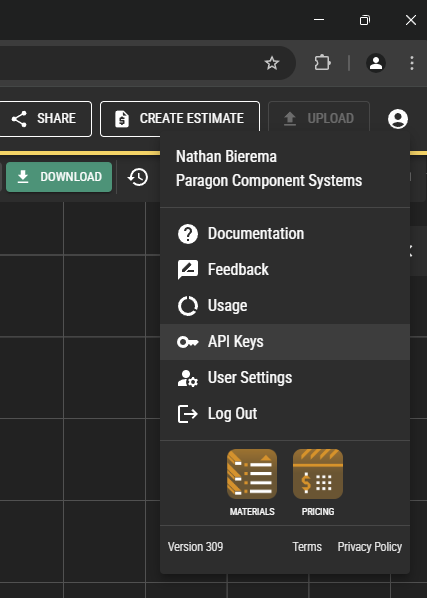
2. Click on the user icon in the top-right
3. Select "API Keys"
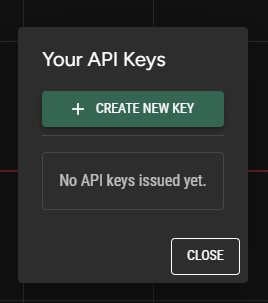
4. Click "Create New Key"
5. Click on the generated API key to copy it to your clipboard. Paste it somewhere secure, so that you can use it authenticate your requests. Note that this API key has the same privileges and access as your normal Paragon account, so keep it as secure as you would a password. There is no way to access it again in Paragon after you've generated it, so if you lose it, you'll have to create a new key.
## Create a project
1. Run the following cURL command to create a project with the name "Test API Project." Replace`` with the API key you generated in the last step.
```sh
curl https://designserver.paragontruss.com/api/public/projects \
--request POST \
--header 'Content-Type: application/json' \
--header 'Authorization: JWT ' \
--data '{
"name": "Test API Project"
}'
```
If successful, it should respond with the `Project` JSON model:
```json
{"guid":"75564bdf-0a00-4f62-9eb9-b92e272d8a08","name":"Test API Project"}
```
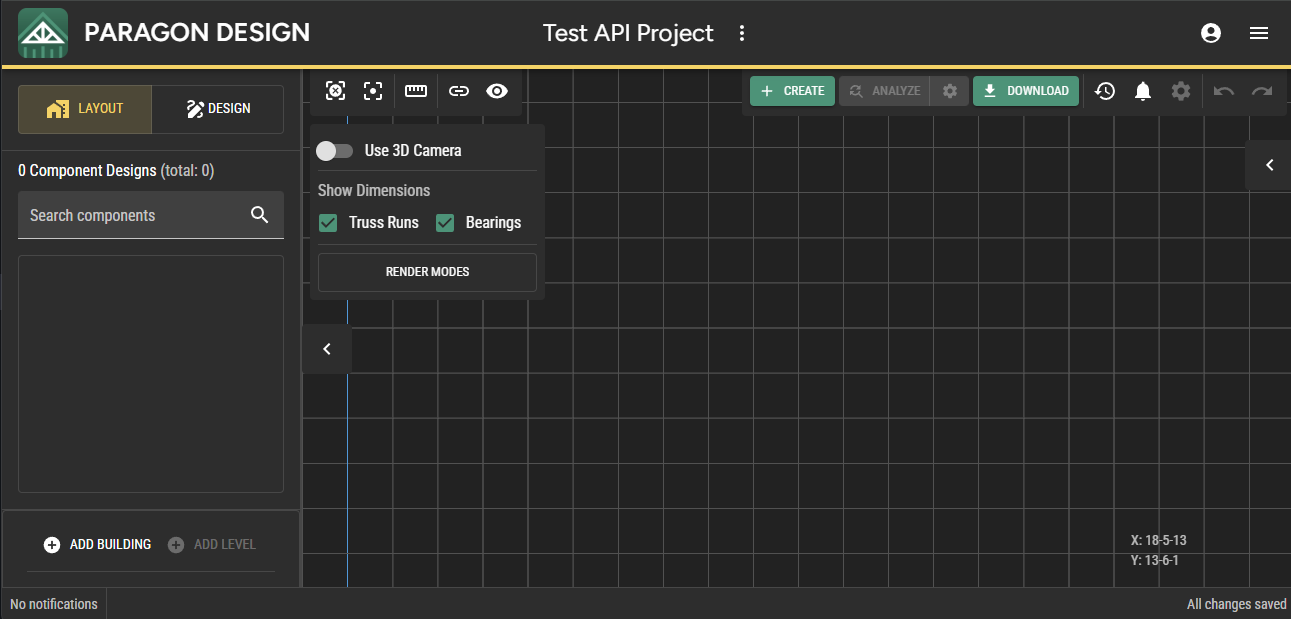
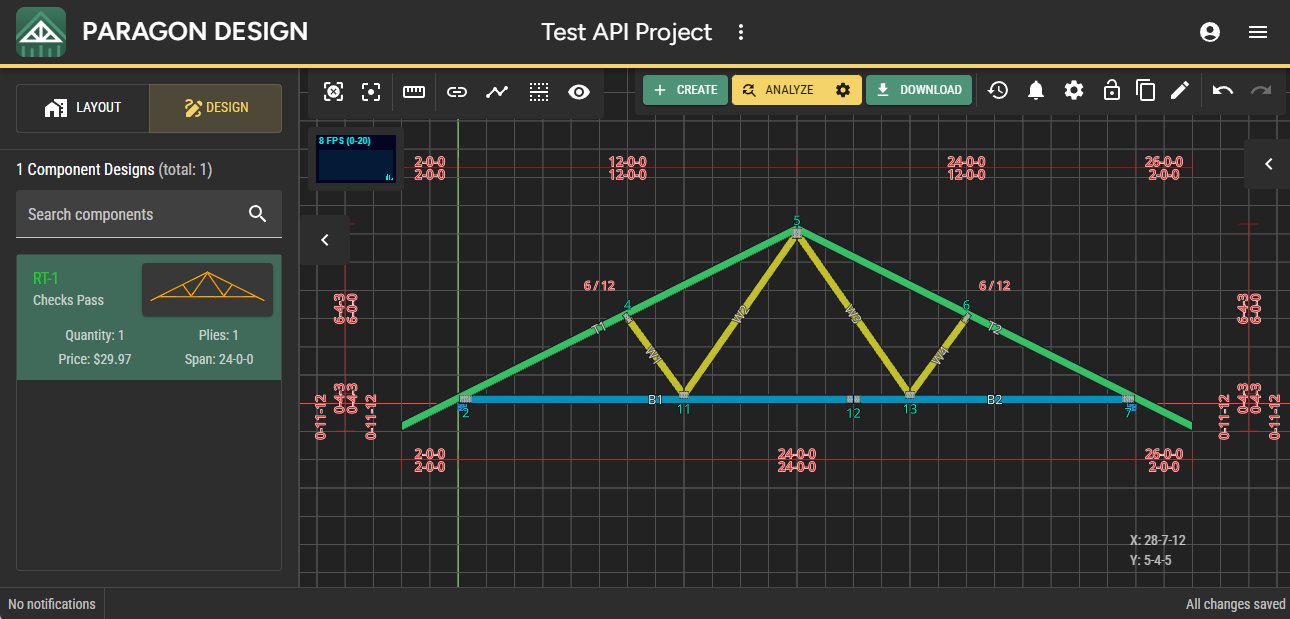
2. Use the GUID from the response data to load the project in Design. The URL to load the project is `https://design.paragontruss.com/`, where `` is the GUID from the response data. You should see an empty project with "Test API Project" in the header bar.
## Create a truss
1. Run the following cURL command to create a truss within the project we created in the last step. Replace `{project-guid}` with the project GUID generated in the last step and replace`` with your API key.
```sh
curl 'https://designserver.paragontruss.com/api/public/projects/{project-guid}/createProfileTruss' \
--request POST \
--header 'Content-Type: application/json' \
--header 'Authorization: JWT ' \
--data '{
"name": "RT-1",
"topChordPoints": [
{
"x": 0,
"y": 4.163118960624631
},
{
"x": 144,
"y": 76.1631189606246
},
{
"x": 288,
"y": 4.163118960624631
}
],
"bottomChordPoints": [
{
"x": 0,
"y": 0
},
{
"x": 288,
"y": 0
}
],
"leftOverhang": {
"distance": 24
},
"rightOverhang": {
"distance": 24
}
}'
```
If successful, it should respond with the `Truss` JSON model:
```json
{"guid":"e3c28e22-9c53-4cc5-914d-987b28c7ebdd","name":"RT-1","plies":1,"members":[{"guid":"65745380-6813-4193-ad6b-a8fc4f12665d","name":"T1","assemblyName":"T1","type":"TopChord","lumber":{"actualThickness":1.5,"actualWidth":3.5,"nominalWidth":4.0,"nominalThickness":2.0,"grade":"Number_2","species":"Southern_Pine","structure":"Sawn","treatmentType":"Untreated"},"geometry":[{"x":-24.0,"y":-7.836881039375365},{"x":-24.0,"y":-11.749999999999996},{"x":144.0,"y":72.24999999999997},{"x":144.0,"y":76.1631189606246}],"thickness":1.5,"overallLength":189.5797101099824,"bevelCuts":[]},{"guid":"9e114f93-2a8a-4f92-bdd8-c196daae1250","name":"T2","assemblyName":"T1","type":"TopChord","lumber":{"actualThickness":1.5,"actualWidth":3.5,"nominalWidth":4.0,"nominalThickness":2.0,"grade":"Number_2","species":"Southern_Pine","structure":"Sawn","treatmentType":"Untreated"},"geometry":[{"x":144.0,"y":76.16311896062459},{"x":144.0,"y":72.25},{"x":312.0,"y":-11.749999999999972},{"x":312.0,"y":-7.836881039375385}],"thickness":1.5,"overallLength":189.5797101099824,"bevelCuts":[]},{"guid":"d06538f8-b5b8-4db5-acf1-e5063b860e0a","name":"B1","assemblyName":"B1","type":"BottomChord","lumber":{"actualThickness":1.5,"actualWidth":3.5,"nominalWidth":4.0,"nominalThickness":2.0,"grade":"Number_2","species":"Southern_Pine","structure":"Sawn","treatmentType":"Untreated"},"geometry":[{"x":6.5000000000000036,"y":3.5},{"x":0.0,"y":0.24999999999999944},{"x":0.0,"y":0.0},{"x":288.0,"y":0.0},{"x":288.0,"y":0.2500000000000284},{"x":281.50000000000006,"y":3.5}],"thickness":1.5,"overallLength":288.0,"bevelCuts":[]},{"guid":"e920a76c-1faa-431b-98fa-e3d24e5cb9d7","name":"W1","assemblyName":"W1","type":"Web","lumber":{"actualThickness":1.5,"actualWidth":3.5,"nominalWidth":4.0,"nominalThickness":2.0,"grade":"Number_3","species":"Southern_Pine","structure":"Sawn","treatmentType":"Untreated"},"geometry":[{"x":93.83040109648518,"y":3.5},{"x":96.0,"y":3.5},{"x":96.0,"y":6.460598503754596},{"x":73.58780701877343,"y":37.0439035093867},{"x":70.41219298122658,"y":35.45609649061328}],"thickness":1.5,"overallLength":40.90067812331938,"bevelCuts":[]},{"guid":"aec1abc4-99d1-49b6-bd60-22c4219c5370","name":"W2","assemblyName":"W2","type":"Web","lumber":{"actualThickness":1.5,"actualWidth":3.5,"nominalWidth":4.0,"nominalThickness":2.0,"grade":"Number_3","species":"Southern_Pine","structure":"Sawn","treatmentType":"Untreated"},"geometry":[{"x":144.0,"y":69.19302527507037},{"x":144.0,"y":72.24999999999997},{"x":140.7210103509135,"y":70.61050517545672},{"x":96.0,"y":6.556974724929603},{"x":96.0,"y":3.5},{"x":98.13432417158722,"y":3.5000000000000004}],"thickness":1.5,"overallLength":83.84844959806945,"bevelCuts":[]},{"guid":"b42110e8-7b19-470e-abe5-0ca0d80be8a5","name":"W3","assemblyName":"W2","type":"Web","lumber":{"actualThickness":1.5,"actualWidth":3.5,"nominalWidth":4.0,"nominalThickness":2.0,"grade":"Number_3","species":"Southern_Pine","structure":"Sawn","treatmentType":"Untreated"},"geometry":[{"x":147.2789896490865,"y":70.61050517545675},{"x":144.0,"y":72.25},{"x":144.0,"y":69.1930252750704},{"x":189.86567582841278,"y":3.5},{"x":192.0,"y":3.5},{"x":192.0,"y":6.556974724929603}],"thickness":1.5,"overallLength":83.8484495980695,"bevelCuts":[]},{"guid":"54e9650b-92b4-407a-93f7-cd791572f2f6","name":"W4","assemblyName":"W1","type":"Web","lumber":{"actualThickness":1.5,"actualWidth":3.5,"nominalWidth":4.0,"nominalThickness":2.0,"grade":"Number_3","species":"Southern_Pine","structure":"Sawn","treatmentType":"Untreated"},"geometry":[{"x":192.0,"y":6.460598503754596},{"x":192.0,"y":3.5},{"x":194.1695989035148,"y":3.5000000000000004},{"x":217.58780701877342,"y":35.456096490613305},{"x":214.41219298122655,"y":37.04390350938674}],"thickness":1.5,"overallLength":40.9006781233194,"bevelCuts":[]}],"plates":[],"bearings":[{"guid":"83d1345f-86e1-43bd-9b8e-cc958c243fda","geometry":{"basePoint":{"x":0.0,"y":0.0},"endPoint":{"x":3.5,"y":0.0}}},{"guid":"ecf90985-38a0-48b2-ad9d-45b4dee9cff5","geometry":{"basePoint":{"x":284.5,"y":0.0},"endPoint":{"x":288.0,"y":0.0}}}],"outsideToOutsideBearingeight":87.9131189606246,"width":336.0}
```
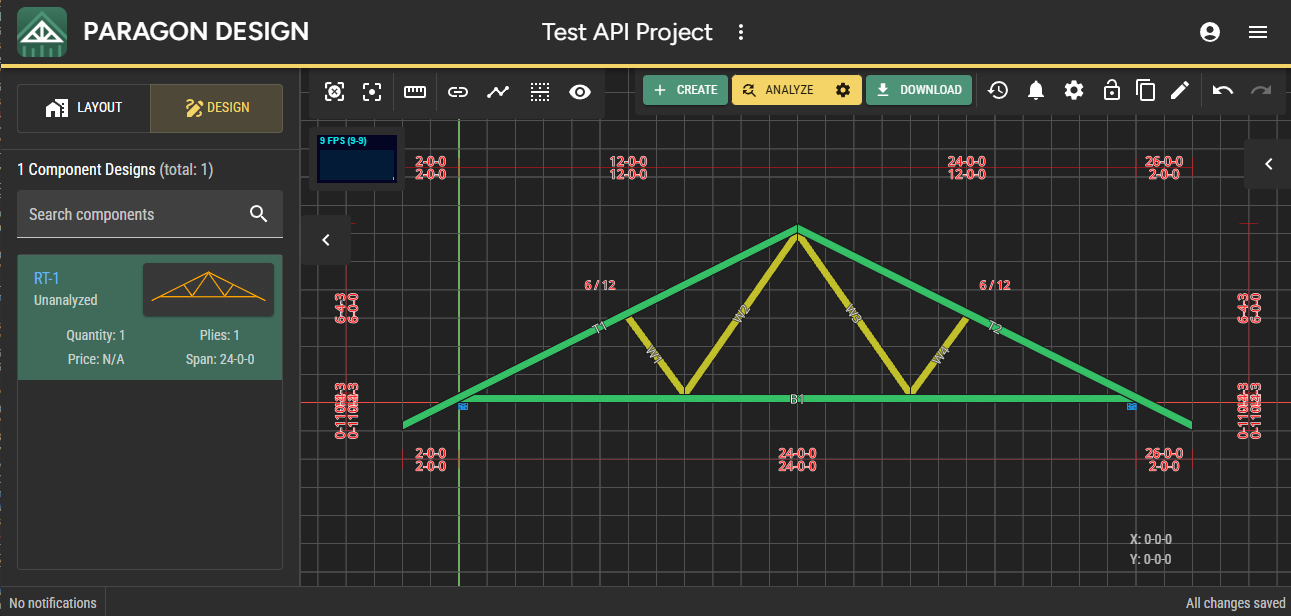
2. Refresh the project page in your browser. You should now see a truss in the project.
## Analyze a truss
1. Run the following cURL command to upgrade and analyze the truss created in the last step. Replace `{truss-guid}` with the truss GUID generated in the last step and replace`` with your API key.
```sh
curl 'https://designserver.paragontruss.com/api/public/trusses/{truss-guid}/upgradeAndAnalyze' \
--header 'Authorization: JWT ' \
--request POST
```
If successful, it should respond with an `AnalysisSet` JSON model:
```json
{"guid":"4cfae6a9-d3bc-4488-9d0e-1a682957663c","capacityRatio":0.96,"maximumBearingReactions":[{"jointLocation":{"x":3.552713678800501E-15,"y":1.75},"upForce":null,"downForce":-1158.565282011909},{"jointLocation":{"x":288.0,"y":1.75},"upForce":null,"downForce":-1158.5652820114412}],"requiredSlopedTopChordPurlinSpacing":45.867919921875,"requiredFlatTopChordPurlinSpacing":null,"requiredBottomChordPurlinSpacing":120.0}
```
2. Refresh the project page in your project page in your browser. You should now see that the truss' label is green in the left sidebar and that the bottom chord has been upgraded from No. 2 to No. 1 lumber in order to pass analysis.
## Additional Resources
* [API Reference](https://designserver.paragontruss.com/api-docs)
* [Node.js Sample App](https://github.com/ParagonTruss/paragon-api-node-samples)
---
# Agent Instructions
This documentation is published with GitBook. GitBook is the documentation platform designed so that both humans and AI agents can read, navigate, and reason over technical content effectively. Learn more at gitbook.com.
## Querying This Documentation
If you need additional information that is not directly available in this page, you can query the documentation dynamically by asking a question.
Perform an HTTP GET request on the current page URL with the `ask` query parameter, and the optional `goal` query parameter:
```
GET https://docs.paragontruss.com/api/quickstarts/getting-started-with-rest.md?ask=&goal=
```
`ask` is the immediate question: it should be specific, self-contained, and written in natural language.
`goal` is optional and describes the broader end goal you are ultimately trying to accomplish on behalf of the user. GitBook uses it to tailor the answer towards what is most useful for that goal.
The response will contain a direct answer to the question and relevant excerpts and sources from the documentation.
Use this mechanism when the answer is not explicitly present in the current page, you need clarification or additional context, or you want to retrieve related documentation sections.