> For the complete documentation index, see [llms.txt](https://docs.paragontruss.com/llms.txt). Markdown versions of documentation pages are available by appending `.md` to page URLs; this page is available as [Markdown](https://docs.paragontruss.com/release-notes/2026.md).
# 2026
Versions 352–387
## Version 387
*10-09-2026*
#### Minor Updates
* When you stop cutting a roof or ceiling plane before the cut forms a closed shape, a message now offers `Get Help ↗`, which opens the training on cutting roof planes
#### Bug Fixes
* Fixed a crash that could occur when deleting several component designs in rapid succession
## Version 386
*10-02-2026*
### Bug Fixes
* Fixed truss envelopes picking up bearings from a different building when a building is drawn over another at the same plate height. Trusses now detect only bearings within their own building, including walls or beams on other levels of that building.
### Paragon Docs Updates
* [Projects App](https://docs.paragontruss.com/projects)
* [Overview](https://docs.paragontruss.com/projects)
* [Interface Overview](https://docs.paragontruss.com/projects/getting-started/interface-overview)
* [Project Tools](https://docs.paragontruss.com/projects/getting-started/project-tools)
* [Component Tools](https://docs.paragontruss.com/projects/getting-started/component-tools)
* [How-To Guides](https://docs.paragontruss.com/projects/how-to-guides)
* [Reference](https://docs.paragontruss.com/projects/reference)
* [Create an Estimate](https://docs.paragontruss.com/projects/how-to-guides#create-an-estimate)
* [Optimize Truss Designs with Paragon D.A.N.](https://docs.paragontruss.com/design/how-to/general/component-optimization)
* [Exhaustive Plate & Splice Search](https://docs.paragontruss.com/design/explanation/analysis#run-an-exhaustive-plate-or-splice-search)
* [Attic Truss](https://docs.paragontruss.com/design/how-to/profile-truss/create-attic-roof-trusses)
* [Adding Walls Using Ghost Levels](https://docs.paragontruss.com/layout/how-to/bearing-envelopes#adding-walls-using-ghost-levels)
* [Interactive Wall Editing](https://docs.paragontruss.com/layout/how-to/bearing-envelopes#interactive-wall-editing)
* [Break Walls](https://docs.paragontruss.com/layout/how-to/bearing-envelopes#break-walls)
* [Paragon Design Overview Video](https://docs.paragontruss.com/design)
* [Paragon Layout Overview Video](https://docs.paragontruss.com/layout)
## Version 385
*09/21/2026*
### Feature Updates
#### Report a Problem
Added a **`Report a Problem`** option to the User dropdown. Users can now submit a bug report directly from the app that will reach Paragon's customer support team.
#### Break Walls and Beams
You can now right click over a Wall or Beam and select Add Break to split the wall or beam into multiple sections. Click again to place the break point, or specify a distance using the dimension box and press Enter to submit it.
#### Load Cases Generated for Manual Loads
Manual loads added by load type will now generate new load cases when no existing load case contains that load type. For example, when you add a roof live load to a truss with only floor loading, multiple roof load cases will be generated. Adding manual wind and rain loads to trusses that do not already have those load types is not yet supported.
#### All paid plans now include Additional Loads in Layout (Beta)
You can now draw area (psf), line (plf), and point (lb) loads directly in Layout, over the trusses they act on. Each load applies automatically to the component designs it covers when trusses are created or regenerated. *Trusses do not yet pick up nearby loads, only loads that overlap them.*
### **Bug Fixes**
* Fixed a case where regenerating a component for a truss envelope could reuse an existing component name even though the profiles differed
* Fixed some cases where automatic plating produced overlapping plates
## Version 384
*09/11/2026*
### Team Plans Only
#### Additional Loads in Layout (BETA)
You can now draw area (psf), line (plf), and point (lb) loads directly in Layout, over the trusses they act on. Each load applies automatically to the component designs it covers when trusses are created or regenerated. Trusses do not yet pick up nearby loads, only ones that overlap them.
#### Redesigned Projects Workspace
Clicking a project now opens a drawer with Overview, Components, and Estimates tabs. The Components tab shows buildings, levels, and components as a tree with truss thumbnails, and bulk actions appear when you check rows.
***
#### All Plans
#### Redesigned Estimates with Live Preview
Creating an estimate now opens a full-screen workspace showing the customer quote itself instead of a configuration dialog. Prices and totals update live as you edit, and the generated PDF matches what you see. Each component row fills in its structural details and truss outline automatically.
#### Roof Plane Cutting Previews (BETA)
While cutting a roof plane, the resulting area is now shaded and updates in real time as you add cuts. Planes and edges you can cut against are highlighted, and hovering one previews the cut before you commit it. Hold **Shift** to cut along an edge instead of a plane.
#### Auto-Cut Roof Planes (BETA)
You now have the option to automatically cut roof planes against other planes as you insert them.
#### **Attic Truss Tools (BETA)**
Attic truss tools are now available to all paid users. The Attic shape, Attic Settings, and Attic Chase Settings are labeled **\[Beta]** while we continue to refine them.
#### Documentation and AI Assistant in Design
Documentation and the AI assistant are now available directly within the app under the Ask a Question icon, so you can search the docs and ask questions without leaving the software.

#### Other Levels Stay Visible While You Draw
Other visible levels are now shown in grayscale during insertion and picking instead of being hidden, and you can snap to them. This makes it easier to trace walls and bearing envelopes from another level.
#### Unified Direction Input for Wall and Beam Insertion
Length, X, Y, Angle, and directions now share one panel during wall and beam insertion, with a live preview that follows your cursor. Values lock only when you type them, so tabbing through the fields no longer constrains the wall, and you can put in non-orthogonal walls without switching modes.
### Minor Updates
* Hovering a roof plane now shows its slope in the tooltip, so you don't have to select the plane to check it.
* Profile generation now converts over-long double cuts on webs into single cuts, reducing the visible gaps against neighboring members that saw error can open up. This is most noticeable on low-slope trusses.
* Load settings fields that previously required feet now accept architectural input and display in your dimension format. A number with no punctuation in these fields now means inches just like every other distance input.
* A red notification now appears whenever changes fail to save, prompting you to reload the project, remove any invalid objects, and contact support if the problem persists. It stays visible until a save succeeds.
### **Bug Fixes**
* Fixed the component list not scrolling to the active component design when returning to the component in Design view
## Version 383
*09/04/2026*
### Feature Updates
#### Documentation and Training Share a Single Upgraded Site
The Training Academy is now part of the Docs site at [`https://docs.paragontruss.com/training`](https://docs.paragontruss.com/training). With this integration, a single search now covers both Documentation and Training content.
#### Layout Performance Improvements
Switching from Design to Layout mode is significantly faster in large and multi-level layouts. Panning, zooming, and inserting things like truss envelopes have also gotten much more responsive on your biggest projects.
#### Material Details in IFC Exports
All IFC truss exports now include lumber and plate material details as custom property sets (`Paragon Lumber` and `Paragon Plate`), with labels matching Truss Design Drawings. Multi-ply trusses also now export with all plies when downloaded as a single component.
### Minor Updates
Profile generation now creates diagonal webs with identical geometry more often, by re-anchoring evenly spaced inner chord joints so that the diagonal webs between them share the same shape
### **Bug Fixes**
* Fixed an issue where unlinked components were hidden from the Components panel while the level filter was set to "Visible Levels." Since unlinked components aren't assigned to a level, that filter no longer excludes them.
## Version 382
*08/28/2026*
### Feature Updates
#### Project Selection on Design Launch
Opening the [Design](https://design.paragontruss.com) home page now shows the Choose Project dialog, where you can search for an existing project or create a new one, instead of automatically loading a personal project.
#### Improved PDF Support for Layout Underlays
Improved PDF snapping underlays support a wider variety of PDF files and provide more consistent imports. Clearer feedback is now provided when a PDF page contains no usable lines for snapping.
#### Restyled Layout Dimensions
Layout dimensions have been restyled to read more clearly.
#### Unlock Everything for a Whole Project
Unlock Everything is now available in the Locking Options submenu. You can now clear every locked setting for analog, loading, plating, lumber, and hangers across a project, building, level, or component design at once instead of unlocking each item for the project separately.
#### QC Tolerances for Top Chord Bearing Joints
Joint QC details now report calculated plate positioning tolerances at top chord bearing joints under TPI 1-2022, where they previously reported zero.
### **Bug Fixes**
* Fixed carried component connection indicators in Layout showing only one location when the connection includes multiple carried components
* Fixed analysis errors under TPI 1-2022 for certain extended chord bearing configurations, including a bearing located partway along a chord rather than at its end, and a bearing at the inner end of a heel slider
* Fixed Hanger schedules for levels showing hangers from other levels with a quantity of 0
## Version 381
*08-21-2026*
### Feature Updates
#### **Improved Pricing App**
The Lumber, Plate, and Hanger price tables in Pricing now share one workflow, with filtering, sorting, grouping, and the ability to update the price or notes on multiple rows at once.
#### Lumber and Plate Lists in the API
Lumber lists and plate lists can now be read and written through the API.
#### Clearer Labeling for Unbalanced Snow Load Cases
Unbalanced snow load cases now include "Snow" in their names, so it's clear which type of unbalanced load is included.
### Minor Updates
* A new API route returns the material price of a single truss, broken out into plate,\
lumber, and hanger prices.
* Support for QC Diagrams under TPI-2022 for more Joint Types
### **Bug Fixes**
* Fixed an error generating loads for a truss carrying a floor truss that in turn carries a roof truss
## Version 380
*08-14-2026*
### Feature Updates
#### Person Loading Option
There is a new option in Load Settings to make the person loading application align with the TPI Advisory Committee’s interpretation of **TPI 1-2022 Section 6.2.2.5**. The option is on by default and only takes effect when the Person Loading setting is on. Learn more [here](https://www.tpinst.org/s/Section-6225-Person-Load_TAC-Interpretation260206.pdf).
### **Bug Fixes**
* Fixed an issue causing Wall and Beam height settings to not persist in the insertion settings for repeated input within the same session
* Fixed an issue causing Layout PDF downloads to fail for some shared sets
* Various improvements to TRE uploads and exports
## Version 379
*07-31-2026*
### Feature Updates
#### Import DXF Files as Underlays
You can now Import DXF files as underlays for reference and tracing.
#### Filter Components by Analysis Status
Filter components in the sidebar with additional options including All, Analysis status, Passing or Failing, Visible or Hidden Levels, and via Linked or Unlinked components.
#### Display Truss-to-Truss Connections in 2D and 3D Layout Views
Truss-to-truss connections are now shown in 2D and 3D Layout views, making it easier to see and manage top chord and bottom chord connections.
#### Non-Concurrent 10 PSF Bottom Chord Live Load
Added a load setting that allows you to toggle whether the bottom chord loading in addition to storage loading is applied concurrently with the storage loading or not (see IBC section 1607 for more information)
## Version 378
*07-24-2026*
### Feature Updates
#### Support Additional TPI 2022 QC Detail Requirements
Expanded support for QC details defined in ANSI/TPI 2022, including updates to plate positioning tolerance calculations and QC visualization for bearing joints.
## Version 377
*07-10-2026*
### Feature Updates
#### Ply Visualization for Beams and Truss Envelopes
Added ply visualization for beams and truss envelopes, clearly distinguishing multi-ply members from single members of the same overall thickness.
#### Support Keyboard Input for Division Work Lines
When creating a Division Work Line, you can immediately enter a division factor or use the **+**/**-** keys (including the numeric keypad) to adjust the value before placing the Work Line.
#### Added Exact Work Line to the Work Line Tool
Added the Exact Work Line tool, enabling Work Lines to be created in exact alignment with existing walls, edges or other objects.
#### TRS File Downloads by Member Length
Added support for filtered TRS file downloads based on member length, enabling separate TRS files to be generated for members at or below a specified length (3' by default) and for members exceeding tha**t** length.
#### Truss Groups in the API
Added support for Truss Groups in the public API, including endpoints to read, create, update, and delete groups under `api/public/projects/{guid}/trussGroups`.
## Version 376
*06-26-2026*
### Feature Updates
#### **Option to Try Off-Center Plating**
There is a new Analysis Setting in Plating Settings, Try Off-Center Plate Shifts, that can improve plating results by shifting them away from their respective joint centers to see if the results improve. The setting is off by default.
#### **Improved Truss Boundary Visualization in Layout**
Truss boundaries are now displayed more clearly in Layout. This is especially helpful when trusses are aligned end-to-end.
#### **Improved Solid View for Walls and Beams**
Enhanced the Solid view for walls and beams. The 2D solid view includes clearer boundaries and the 3D view is now translucent.
#### Envelope Procedure Support for Monoslope Trusses
Added support for analyzing monoslope trusses using the Envelope Procedure in Gable roofs.
#### Increased Maximum Zoom in Design Mode
Increased the maximum zoom level in Design Mode, allowing for closer inspection and more precise editing.
## Version 375
*06-19-2026*
### Feature Updates
#### Support Angle Snapping During Point Selection
Angle snapping is now available during second point selection for most layout objects. This will be helpful when defining angled walls.
#### Improved Wall Insertion with Distance Snapping
Create non-orthogonal (or "angled") walls directly during wall creation with distance snapping support for feet, inches, and ¼-inch increments.
## Version 374
*06-12-2026*
### Feature Updates
#### Automatic Hanger Bearing Detection at Bearing Faces
A truss envelope that stops at the face of a bearing will now generate a truss with a hanger bearing on its bottom chord.
#### Improved Work Line Creation
Users can now create multiple work lines more efficiently using in-scene workflows. Work lines can be created by selecting points or existing lines, with support for point-to-point, point-and-angle, parallel, perpendicular, and division line types. You can also specify which type of work line you'd like to create via the right sidebar and specify its properties in sequence. Toggle "Insert Automatically" or use the keyboard shortcut Alt when inserting to insert your line as soon as its defined and to remain in work line creation mode afterward.
#### Lock Carried Component Connections
Carried Component connections (e.g. jack-girder connections) can now be locked via the Properties panel. Locked connections will be maintained when you Refresh Connections or Regenerate Component in Layout.
#### Truss Label Placement Options
Labels can now be positioned on the left, center, center-left, center-right, or right side of a truss envelope. Selected label positions are also preserved in Layout PDF and DXF outputs.
#### Project Names in Design Browser Tabs
Design browser tabs now include the name of the project or shared set that is open in the tab.
### Bug Fixes
* Resolved several issues that could cause crashes while reviewing Analysis & History results for plate pairs.
* Resolved some cases where problems with one truss envelope in a layout could prevent other envelopes from generating trusses.
## Version 373
*06-05-2026*
### Feature Updates
#### Enhanced Snapping Controls and Interactive Editing
Interactive editing now supports snapping to any object that provides snap points, including underlays, roof planes, truss envelopes, walls and beams and other items. A new Snapping Settings menu has been added to the toolbar providing control over snapping behavior across editing contexts. Users can also disable grid snapping during interactive editing.
#### Added Component List Filtering
Added filtering controls to the Components panel, allowing users to view all components or unlinked components without having to toggle between Layout and Design view, and you can still filter based on the active level in Layout view.
#### Set Design Code in Load Settings
You can now set the building code in the General section of a Project or Component's Load Settings
#### Improved Display of Unbounded Ceiling Planes
Improved the display of ceiling planes that are not fully bounded by cuts. Unbounded indicators now render more consistently in edge cases, including very short boundary segments.
### Minor Changes
* You can now use Shift + Click when picking a roof plane definition to define it by an Absolute Line
* Feature Pattern Container creation now references existing wall elevations and project settings to provide better default settings
* Improved girder load transfer for certain combination load cases
* Reweb Truss now succeeds in more cases
### Bug Fixes
* Fixed an error generating load cases due to applying a preset for one building code onto a project with a different building code
* Fixed an issue that allowed levels containing layout objects to be deleted when the level was hidden. Levels with existing components can no longer be deleted until those objects are removed
* Fixed an issue where the active building and level could become hidden after creating a chase or step
## Version 372
*05-22-2026*
### Feature Updates
#### Combined Wall Insertion Workflow
Streamlined Wall insertion by combining Direction + Length and Point Selection workflows into a single interactive process. Added improved visual previews, simplified Start/End point terminology, enhanced keyboard shortcuts, insert-and-repeat behavior, automatic insertion options, roof plane previews, and improved undo support for chained Wall insertions.
#### Interactive Editing for Walls
Added interactive wall editing support, allowing wall endpoints to be dragged to adjust length and entire walls to be repositioned directly in the workspace. This update also introduces enhanced snapping behavior and visual snapping guidelines to improve alignment and editing precision.
#### Reweb Truss Improvements
Many cases that could not be automatically webbed using the Reweb Truss tool are now webbed, and several cases produce better webbing than before.
#### Profile Truss Seat Cut Honors Bearing Width
Trusses created manually from a profile or truss shape now accurately adapt the seat cut at each bearing to the bearing's width.
#### Improved Heel Height Logic for Trusses
Improved heel height and geometry calculations when manually-creating profile trusses and fixed some issues with butt cut and heel height interaction and respecting Material width and Profile Default settings.
#### Bug Fixes
* Fixed an issue where walls could be inserted with the incorrect thickness after inserting a multi-ply beam
* Fixed an issue where “Bearing on Carried Component” would sometimes not be set after regenerating a component or its connections
* Fix missing dimensions for Layout PDFs generated from layouts with no Levels
## Version 371
*05-15-2026*
### Feature Updates
#### Add Simpson DDP File Support and Expand tdlTruss Import Compatibility
Added support for uploading Simpson truss files contained in DDP project files.
#### Add Manual Thermal Factor in Snow Load Settings
Added support for manually specifying the thermal factor in Load Settings instead of calculating it.
#### Implemented Hotkeys for Items in All Creation Menus
Now all insertion menus have hotkeys for selecting each item just like the Quick Insertion menu.
### Bug Fixes
* Fixed an issue where extended top chord bearings were detected on small jack trusses
* Fixed an issue where king jacks generated with square cuts could create incorrect carried component relationships and duplicate bearings at corners
* Fixed an issue where some Alpine PIC files could not be uploaded or imported successfully
* Fixed an issue where profile truss generation could produce a vertical web that was undesirably based on a splice
## Version 370
*05-08-2026*
### Feature Updates
#### Improved Member Upgrades when there are Member Dependencies
Automatic Member Upgrades now considers more cases where top and bottom chords achieve better results when upgraded together instead of independently.
#### Improved Accessibility of Basic Bearing Properties
Basic bearing properties are now always visible in the bearing properties subpanel.
### Bug Fixes
Fixed an issue where duplicated roof planes could lose their relative orientation and appear flipped after duplication.
## Version 369
*05-01-2026*
### Feature Updates
#### Added Beam Objects to Layout
Beams are now distinct objects in Layout. You can control their visibilities independent of walls and change properties like their thickness, number of plies, and whether they are dropped or flush.
#### Option to Maintain Linked Components When Transforming Truss Envelopes
Component links can be preserved when moving, copying, mirroring, or rotating truss envelopes. The component link will be preserved even if the linked component does not "fit" in the new location.
#### Improved Plating for some Top Chord Bearing Joints
More top chord bearing joints with bearing blocks that used to require manual plating can now be automatically plated.
#### Minor Changes
* Added Flip Truss Envelope(s) to the right-click menu
* `Ctrl` + `Q` to open the insertion dialog now works for macOS
### Bug Fixes
* Fixed several cases where Reweb Truss would produce an "infinite member" with invalid geometry
* Fixed an issue with renaming analysis sets in the analysis history panel
## Version 368
*04-24-2026*
### Feature Updates
#### Option to Release Bearings for Uplift
Introduced a new bearing condition option that prevents support locations from being analyzed for uplift.
#### TRE Hinge Truss Import and Shop Output Support
Support has been added for importing trusses with hinge plates via TRE files and generating shop outputs for production.
#### Added New Keyboard Shortcuts for Designing Envelopes
* **Ctrl + G — Design / Regenerate Components**\
Designs selected envelopes with matching if any are unlinked; regenerates all if already linked
* **Ctrl + Shift + G — Choose Existing Design / Unlink Components**\
Prompts to link unlinked envelopes; unlinks all if already linked
* **Ctrl + Alt + G — Create New Design**\
Creates a new design when exactly one selected envelope is unlinked; otherwise displays an error
In Design, `Ctrl`+`/` will bring up the full list of [keyboard shortcuts](https://docs.paragontruss.com/layout/layout-overview-1/tools-and-features#keyboard-shortcuts-hotkeys).
### Bug Fixes
* Resolved an issue where the **Adjust Depth** tool could get out-of-sync with the actual truss depth and produce unexpected results
## Version 367
*04-17-2026*
### Feature Updates
#### Support Whole Project Downloads by Level
Add support for downloading Layout files by individual levels within a project for .dxf, .ifc, and .pdf files. Choose "All levels" to get a .zip containing each level as a separate file
#### Support Bevel & T-Plate Selection
Plate Upgrades will now add Bevel & T-Plates where applicable if they are included in your active Plate List.
## Version 366
*04-10-2026*
### Feature Updates
#### Include Multiple PDF Underlays in Layout
You can upload multiple snapping underlays in Layout View, and they will be saved to your project. In the Snapping Underlays menu, you can toggle the visibility for each underlay and access their properties.
#### Allow Rotating Snapping Underlays
You can now rotate snapping underlays to align them with your layout.
#### Shift-Select to Select Range in Sidebars
Easily select multiple objects in either the left or right sidebar by selecting one item and then holding shift while you select another item in the same collection. All items in between will be selected. Note that this only works for items that support multi-select.
#### Preserve Name when you Regenerate Component
When regenerating a component, edits you've made to its name will be preserved in most cases.
#### Display Truss Envelope Length in Hover Preview
The hover-over preview for unlinked truss envelopes now includes the envelope's length with and without overhang in addition to its height.
#### Additional Loads and Carried Components Added to Create Menus
Add Additional Loads (e.g. Manual and Moving Loads) and Carried Components quickly from the Create and right-click menus in Design View.
### Layout PDF Improvements
Made various improvements to text scaling and label positions. The truss schedule now overflows onto multiple pages to maintain a readable font size.
### Bug Fixes
Fixed an issue where applying a Load Settings preset to a project with different Load Settings options could trigger “Error while generating load cases” during analysis.
## Version 365
*04-03-2026*
### Feature Updates
#### Bearing Envelope Insertion
* Length dimensions now display during bearing envelope insertion
* End label no longer blocks snapping points while placing envelopes
* First envelope no longer defaults to (0, 0) as the base point
* Esc key now steps back through placement by clearing the end point first, then the base point (when not using continuous mode)
#### Snapping with Hidden Objects
Point snapping now respects layout object render modes, preventing selection of objects that are hidden. This applies to related tools such as truss envelope insertion along with other tools.
#### Plate Stamp Positioning and Hole Updates
Updated the positioning for the plate manufacturer text stamp, and added support for staggered plate holes.
#### Ordered Cuts for Multiple Truss Envelopes
Added support for applying Ordered Cuts to multiple truss envelopes at once.
#### Scale Picking for Uploaded Snapping Lines
Enhanced the scale picking experience for uploaded snapping lines by automatically triggering point selection, allowing cancellation at any step, auto-focusing the distance input after point selection, and enabling the Apply Scale button during input with validation to prevent invalid values.
#### PDF Upload Notifications
Adjusted notification priority so PDF upload failures are more visible and not hidden by other error messages.
#### Atlantic Corner Set
You can now generate Atlantic Corner Sets automatically during corner set creation. Both Stepdown and Atlantic Corner Sets are supported.
### Bug Fixes
• Layouts can no longer be saved if a truss or bearing envelope has identical left and right points.
## Version 364
*03-27-2026*
### Feature Updates
#### Bevel and T-Plate Support
[Bevel and T-Plates](https://docs.paragontruss.com/design/how-to/general/using-special-plate-types) can now be manually inserted into truss designs and included in [Plate Lists](https://docs.paragontruss.com/materials).
#### Add Bearing Envelope Dimensions to Layout Downloads
Layout DXF and PDF downloads now consistently include bearing, truss run, and user dimensions.
#### Import More DXF File Objects as Work Lines
We now support most [Insert](https://help.autodesk.com/view/OARX/2024/ENU/?guid=GUID-28FA4CFB-9D5E-4880-9F11-36C97578252F) and [Line](https://help.autodesk.com/view/OARX/2024/ENU/?guid=GUID-FCEF5726-53AE-4C43-B4EA-C84EB8686A66) objects in DXF files in addition to Polylines.
#### Minor Updates
* When adding a roof plane at a line where structural and non-structural bearing envelopes intersect, the structural bearing will be preferred
* You can now change the Member Type for multiple selected members at once
* Transformation tools are now available in Properties when a single, unlinked truss envelope is selected, aligning behavior with multi-selection
* Max Axial Forces are now sorted consistently on Truss Design Drawings, with analog links ordered by ascending joint numbers and the lower joint number listed first
### Bug Fixes
* Fixed an issue where certain DXF files could not successfully import all lines
* Resolved an issue preventing Component IFC downloads for single and multiple components, ensuring downloads now work consistently across Design and Shared Sets
* Resolved an issue where Layout PDF downloads failed for components containing “Special” connectors
* Fix Layout PDF Downloads for Short Overhang Segments
## Version 363
*03-20-2026*
### Layout Updates
#### Truss Envelope Insertion
Truss envelope ends will no longer be automatically calculated during insertion after you pick specific end points. Use the Recalculate buttons when you want the ends adjusted automatically, or adjust them after inserting the truss envelope using trim/extend or choosing new end points.
#### Control Plane Visibility While Cutting Truss Envelopes
You can now adjust the visibility of roof and ceiling planes while adding top and bottom cuts to truss envelopes. Changes you've made to your visibility settings before you start cutting will also be respected.
#### Scale PDF Underlays Using Ratio
When you import [PDF Underlays](https://docs.paragontruss.com/layout/layout-overview-1/interface-overview/layout-options-toolbar/pdf-underlay), you can enter the scale as a ratio.
#### Focus Camera to Selected Item(s)
[**Focus Camera**](https://docs.paragontruss.com/layout/layout-overview-1/interface-overview/layout-options-toolbar/view-and-link-options) (`Ctrl + .`) will now focus to all selected objects.
### Design Updates
#### Prefer using one plate on short stacks
Short top chord sliders like the ones at the ends of many floor trusses will get a single plate more often.
#### Avoid Upgrading Stacked Members Unnecessarily
Sometimes both members of a chord stack would be upgraded when only one of them needed to be, but they are now considered independently in those cases.
### Bug Fixes
* Fixed the initial zoom behavior in a 3D view to ensure all layout objects are visible
* Fixed an issue with panning layouts in 3D that could cause unexpected movement
* Fixed an issue with computing overhangs on roof planes that cut against an object in another level
* Many TRE files that could not be imported or could not be edited after importing are now partially or fully supported
## Version 362
*03-13-2026*
### Feature Updates
#### Improved Shear-Tension Check for Splice Plates
The TPI 8.6 Shear-Tension check was not taking full advantage of the available plating area in some cases. Some splice blocks are now more effective.
#### IFC Import
More IFC files now import accurately
### Bug Fixes
* Fixed a case where plates were sometimes not being upgraded to a passing plate automatically
* Fixed an issue with selecting bearing envelopes in 3D
## Version 361
*03-06-2026*
### Feature Updates
#### Bearing Envelope Visuals
Added solid fill option for bearing envelope visuals in 2D.
Improved edge rendering of bearing envelopes in 3D Layout.
#### Truss Dimension Visuals
Dimensions now consistently appear in front of truss objects and have tick marks for increased clarity.
#### Additional Improvements
* Reset View now works the same way for multi-level Shared Sets as it does in Layout
* Added Snap Points for Feature Pattern Containers and made them available in the Snap Against options
* Layout DXF exports place non-structural bearing envelopes on a separate layer
### Bug Fixes
* Fixed some object selection bugs with defining roof planes and moving ceiling trays
* Fixed a crash related to truss envelopes with undefined ordered cuts
## Version 360
*02-27-2026*
### Feature Updates
**Improved IFC Import**
We now import walls and roof planes from a wider variety of IFC files. See the [documentation](https://docs.paragontruss.com/layout/reference/upload-options#upload-ifc-files-beta) for more details about what is supported.
**Improved Lap Joint Analysis**
We improved our modelling of force transfer through partial chord stacks.
### Bug Fixes
* Fixed a case where the plate at the peak of the vault on a scissor truss errored during analysis
* Fixed a crash that could happen if certain actions were performed before the project was completely loaded
* Fixed a reported issue that could potentially cause Layout to get stuck in an invalid state
## Version 359
*02-20-2026*
### Feature Updates
**Additional API route**
Added an [API route](https://designserver.paragontruss.com/api-docs/#tag/trusses/GET/api/public/trusses/{guid}/mostRecentAnalysisSetGuid) to retrieve the most recent Analysis Set for a Component Design
**Minor Updates**
* Fixed an issue with importing TREs that include pressure treatment lumber
* Improved analysis of stacked chords with different lumber grades
#### Bug Fixes
* Fixed a crash that could happen after deleting a component design
## Version 358
*02-13-2026*
### Feature Updates
**Truss Groups**
Trusses can now be organized into [Truss Groups](https://docs.paragontruss.com/layout/how-to/truss-envelopes/create-and-manage-truss-groups) in Layout.
**Support 2025 New York building codes**
We now support the BCNYS and RCNYS 2025 building codes.
### Bug Fixes
* Fixed an issue during analysis for some trusses with beam pockets
* Fixed an issue while importing TRE files that were using the TPI-1 2002 Fabrication Tolerance scale
## Version 357
*02-06-2026*
### Feature Updates
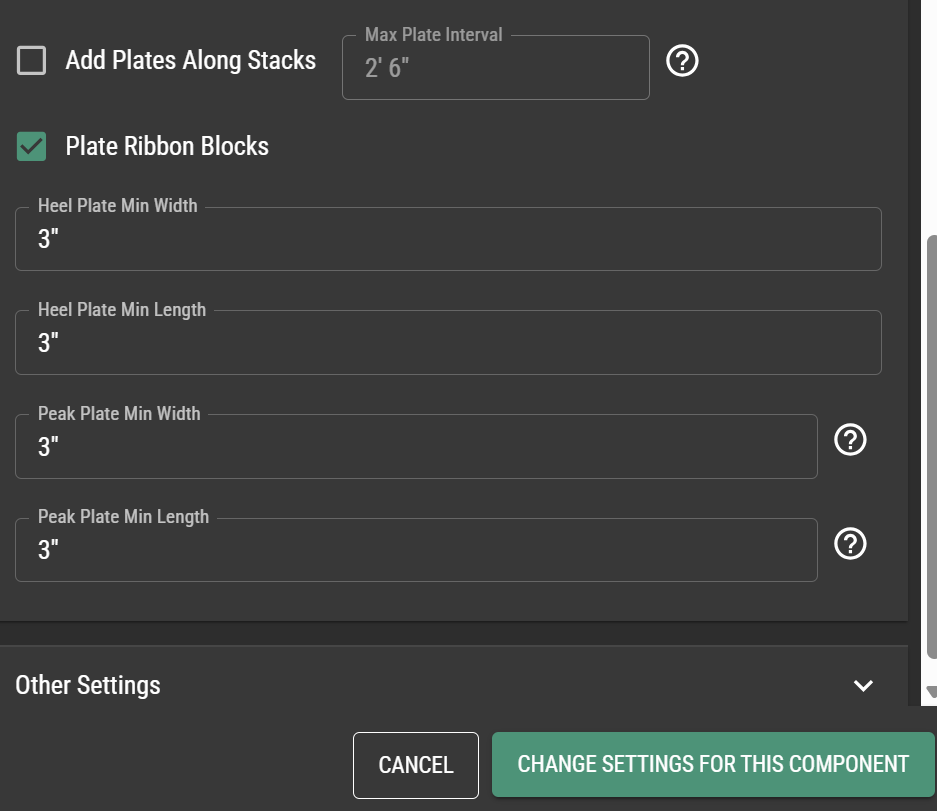
**Minimum plate settings**
Minimum plate sizes can now be specified for heel and peak joints via Analysis Settings > Plating Settings.
**File downloads available in the API**
[New API endpoints](https://docs.paragontruss.com/api) are now available for downloading component files.
**Improved multi-select dialog**
If an object is already selected in Layout, the multiselect dialog will have that object's type selected by default. This makes it easier to select objects of the same type as the one you already have selected.
**Bearing Hatching on Layout DXF download**
Bearing hatching is now separated into its own layer in DXF downloads.
## Version 356
*01-30-2026*
### Feature Updates
**Bearing hatching is included in Layout downloads (DXF and PDF)**
Bearings in Layout downloads now display the same hatching pattern as the Layout.
**Bearing top elevation shown on hover**
Bearing envelope top elevations are now shown in Layout when you hover over them.
**More helpful carried components count**
The Carried Components collection in the Navigation Subpanel now includes repeated carried component connections in its count.
### Bug Fixes
* Fixed a crash that could happen while selecting items during Analysis
## Version 355
*01-23-2026*
### Feature Updates
**Improved plating for ribbon blocks in lap/key end conditions**
We now avoid plating ribbon blocks with plates that extend into the interior of the truss in more cases.
Before
After
**Minor Updates**
* Fixed some issues with truss run dimensions either not showing up or being duplicated in Layout
* Fixed an issue handling "curly" apostrophes that some MacOS devices were adding to distance fields
## Version 354
*01-16-2026*
### Feature Updates
**Visual Indicators for Bearings**
There is a new "Hatched" view mode for Bearings that assigns different hatching patterns based on their top elevations. Also, non-structural bearings are now colored differently than structural ones and their visibility can be toggled independently.
**Minor Updates**
* [Projects](https://www.paragontruss.com/solutions#projects) now loads your team's projects much faster
### Bug Fixes
* Fixed an error that prevented downloading Joint QC Detail PDF for certain trusses
## Version 353
*01-12-2026*
### Feature Updates
**Material Settings Presets**
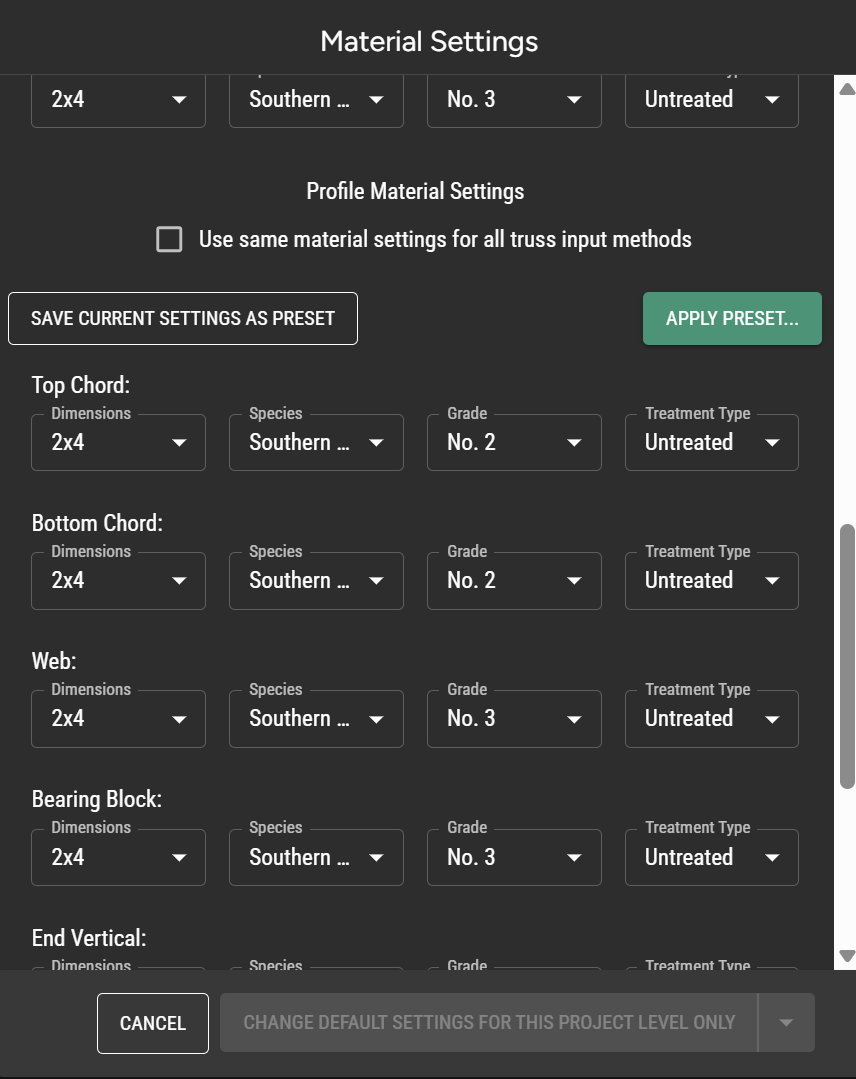
You can now create and apply material settings presets from any material settings dialog.
**Customize Fabrication Tolerance**
You can now set fabrication tolerances for front-back and top-bottom plates via Analysis Settings > Plating Settings.
**IFC Import \[BETA]**
Creating layouts by uploading IFC files is now in Beta. Read more about which IFC files are supported [here](https://docs.paragontruss.com/layout/reference/upload-options), and [let us know](https://www.paragontruss.com/about#contactus) if you'd like us to add support for yours!
**Support for California building codes**
Added support for California 2025 building codes.
### Bug Fixes
* Fixed an issue generating loads on overhangs for low-slope mono-slope roofs
## Version 352
*01-05-2026*
### Bug Fixes
* Fixed an issue where dimension labels in Design could overlap the truss
* Fixed an issue with downloading QC diagrams in some cases
* Fixed an issue causing shared sets not to load in some cases
---
# Agent Instructions
This documentation is published with GitBook. GitBook is the documentation platform designed so that both humans and AI agents can read, navigate, and reason over technical content effectively. Learn more at gitbook.com.
## Querying This Documentation
If you need additional information that is not directly available in this page, you can query the documentation by asking a question.
Perform an HTTP GET request on the following URL with the `ask` and `goal` query parameters:
```
GET https://docs.paragontruss.com/release-notes/2026.md?ask=&goal=
```
`ask` is the immediate question: it should be specific, self-contained, and written in natural language.
`goal` is what the user is ultimately trying to achieve, the reason they need the answer. Sharing it helps GitBook give you a better, more relevant answer. A goal is most helpful when it describes the outcome the user wants rather than restating the question. For example, with `ask=how do I create an API token`, a goal like `automate deployments from our CI pipeline` lets GitBook tailor the answer to that use case.
The response will contain a direct answer to the question and relevant excerpts and sources from the documentation.
Use this mechanism when the answer is not explicitly present in the current page, you need clarification or additional context, or you want to retrieve related documentation sections.


 ### Minor Updates
* Hovering a roof plane now shows its slope in the tooltip, so you don't have to select the plane to check it.
* Profile generation now converts over-long double cuts on webs into single cuts, reducing the visible gaps against neighboring members that saw error can open up. This is most noticeable on low-slope trusses.
* Load settings fields that previously required feet now accept architectural input and display in your dimension format. A number with no punctuation in these fields now means inches just like every other distance input.
* A red notification now appears whenever changes fail to save, prompting you to reload the project, remove any invalid objects, and contact support if the problem persists. It stays visible until a save succeeds.
### **Bug Fixes**
* Fixed the component list not scrolling to the active component design when returning to the component in Design view
## Version 383
*09/04/2026*
### Feature Updates
#### Documentation and Training Share a Single Upgraded Site
The Training Academy is now part of the Docs site at [`https://docs.paragontruss.com/training`](https://docs.paragontruss.com/training). With this integration, a single search now covers both Documentation and Training content.
#### Layout Performance Improvements
Switching from Design to Layout mode is significantly faster in large and multi-level layouts. Panning, zooming, and inserting things like truss envelopes have also gotten much more responsive on your biggest projects.
#### Material Details in IFC Exports
All IFC truss exports now include lumber and plate material details as custom property sets (`Paragon Lumber` and `Paragon Plate`), with labels matching Truss Design Drawings. Multi-ply trusses also now export with all plies when downloaded as a single component.
### Minor Updates
* Hovering a roof plane now shows its slope in the tooltip, so you don't have to select the plane to check it.
* Profile generation now converts over-long double cuts on webs into single cuts, reducing the visible gaps against neighboring members that saw error can open up. This is most noticeable on low-slope trusses.
* Load settings fields that previously required feet now accept architectural input and display in your dimension format. A number with no punctuation in these fields now means inches just like every other distance input.
* A red notification now appears whenever changes fail to save, prompting you to reload the project, remove any invalid objects, and contact support if the problem persists. It stays visible until a save succeeds.
### **Bug Fixes**
* Fixed the component list not scrolling to the active component design when returning to the component in Design view
## Version 383
*09/04/2026*
### Feature Updates
#### Documentation and Training Share a Single Upgraded Site
The Training Academy is now part of the Docs site at [`https://docs.paragontruss.com/training`](https://docs.paragontruss.com/training). With this integration, a single search now covers both Documentation and Training content.
#### Layout Performance Improvements
Switching from Design to Layout mode is significantly faster in large and multi-level layouts. Panning, zooming, and inserting things like truss envelopes have also gotten much more responsive on your biggest projects.
#### Material Details in IFC Exports
All IFC truss exports now include lumber and plate material details as custom property sets (`Paragon Lumber` and `Paragon Plate`), with labels matching Truss Design Drawings. Multi-ply trusses also now export with all plies when downloaded as a single component.