> For the complete documentation index, see [llms.txt](https://docs.paragontruss.com/llms.txt). Markdown versions of documentation pages are available by appending `.md` to page URLs; this page is available as [Markdown](https://docs.paragontruss.com/design/explanation/notifications-and-errors.md).
# Notifications and Errors
This is a list of some common errors and notifications you may encounter in Paragon Design. This is not a comprehensive list but is meant to serve as a helpful guide when using our software.
## Cannot duplicate truss at this time
This notification can occur if you are trying to duplicate a truss but some other operation is happening in the background. For instance, there could be an analysis operation in progress or some other action. You can look in the lower right corner of the screen to verify that you are seeing `All Changes saved` before trying the action again.
### Cannot Generate TDD because the truss has not been analyzed
This error is typically encountered when trying to download a Truss Design Drawing for a component that has un-analyzed changes. To resolve the error, first [analyze](/design/how-to/general/run-and-view-component-analysis.md) the component then try the download again.
### Cut sheet generation failed
You may get this error when attempting to download a [Shop Drawing PDF](/design/reference/download-options.md#shop-drawings). This error is typically due to the selected component having un-analyzed changes. To resolve the error, first [analyze](/design/how-to/general/run-and-view-component-analysis.md) the component then try the download again. This error can also occur if you are trying to download a shop drawing but no components are selected.
### Plate Pair A overlaps Plate Pair B
This error is caused when two plate pairs overlap like so:
This can happen for a number of reasons. In the example above, plate pair 5b was moved slightly off of the joint. Because it was not locked, when analysis was run again, the auto-plating mechanism added a plate on the original joint and left the previous plate in place causing the overlap. In this example, you could delete plate pair 5b.
Manual Loads can also cause unexpected plate pair overlaps like this. Since plating occurs during analysis, if the program determines that the component needs an extra plate based on the location of a load case, it may incorrectly add an additional plate to a joint that has already been plated.
To resolve this issue, check if you have added any Manual Loads and adjust them accordingly.
### Error while auto-splicing
This error typically occurs during upgrade and analysis. It indicates that the program had an issue trying to figure out how to auto splice a member. The error message will include the component in question
### We are having trouble loading your custom settings, and they may not be applied correctly
You will typically only encounter this notification if there is an issue with the program connecting to one of our services. You can try to reload the page to see if the notification goes away. If this does not resolve the issue, please contact Paragon Support for further assistance. When you see this notification, it means that any custom [user settings](/design/getting-started/tools-and-features/user-settings.md)you have previously set can not be loaded and are not being applied to the current project.
### Unable to access user settings. Please reload the page and try again
Similarly to the notification above, you will see this error message if there is an issue loading your settings from the server and you try to open the [User Settings panel](/design/getting-started/tools-and-features/user-settings.md). If reloading the page does not resolve the issue, please reach out to Paragon Support.
### Reference line cant' be deleted because members X and unknown depend on it
This error occurs when trying to delete reference lines. If the reference line you are trying to delete is being used by other members and components, you will not be able to delete it until you also delete or change those components.
### Profile must be closed before proceeding
When inserting a component using the Free Form tool, if you accidentally click on Shape Details or Structural details you will see this notification. These settings are not available to be modified until the profile has been finished. Close the profile to proceed. See the [Profile Line Tool](/design/explanation/component-insertion.md#profile-line-tool)explanation for more information.
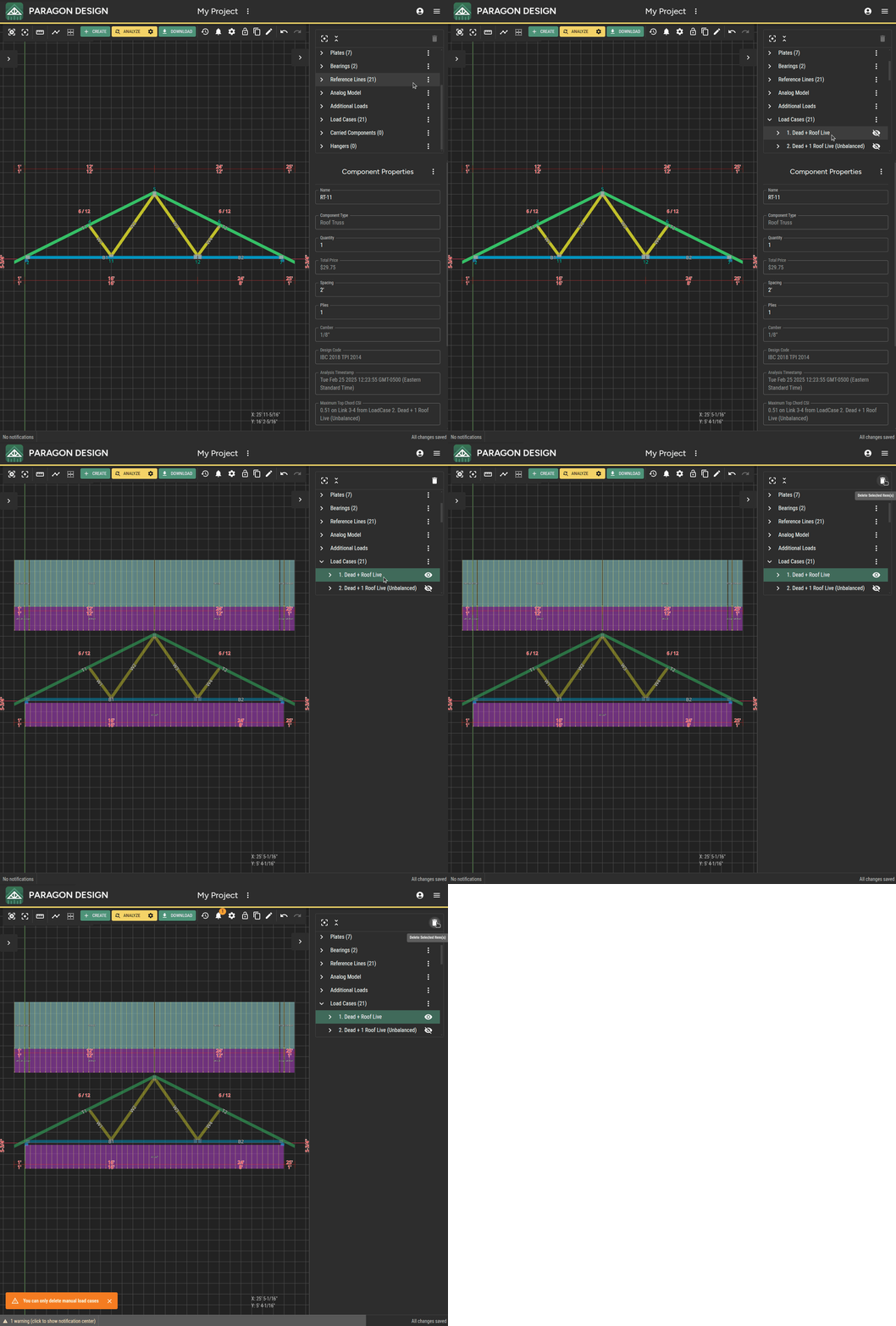
## Load Cases
### You can only delete manual load cases
You will receive this notification if attempting to delete a predefined load case.
---
# Agent Instructions
This documentation is published with GitBook. GitBook is the documentation platform designed so that both humans and AI agents can read, navigate, and reason over technical content effectively. Learn more at gitbook.com.
## Querying This Documentation
If you need additional information that is not directly available in this page, you can query the documentation dynamically by asking a question.
Perform an HTTP GET request on the current page URL with the `ask` query parameter, and the optional `goal` query parameter:
```
GET https://docs.paragontruss.com/design/explanation/notifications-and-errors.md?ask=&goal=
```
`ask` is the immediate question: it should be specific, self-contained, and written in natural language.
`goal` is optional and describes the broader end goal you are ultimately trying to accomplish on behalf of the user. GitBook uses it to tailor the answer towards what is most useful for that goal.
The response will contain a direct answer to the question and relevant excerpts and sources from the documentation.
Use this mechanism when the answer is not explicitly present in the current page, you need clarification or additional context, or you want to retrieve related documentation sections.
.png?alt=media)
.png?alt=media)
.png?alt=media)
.png?alt=media)
.png?alt=media)
.png?alt=media)
.png?alt=media)
.png?alt=media)
.png?alt=media)

.png?alt=media)